The Diff operation can be used to compare two data sets. One data set is the comparison source (reference / e.g. an older data set), the other data set is the main source (the current/new data). The following data records are made available on four outputs:
- Unchanged: Data for which no change has been detected.
- Changed: Data that is present in both data sets but has been changed.
- Added: Data that was not yet present in the reference data set.
- Deleted: Data that was present in the reference data set and is now missing
Please note: The two data sets used must contain the same columns/attributes.
For better understanding an example:
The reference table (older data set): Download CSV
| product_id | name | color | price |
|---|---|---|---|
| 1 | Chair | Red | 50 |
| 2 | Table | Blue | 120 |
| 3 | Lamp | White | 30 |
| 4 | Shelf | Black | 80 |
The source table (current/new data): Download CSV
| product_id | name | color | price |
|---|---|---|---|
| 1 | Chair | Red | 50 |
| 2 | Table | Blue | 150 |
| 3 | Lamp | Green | 35 |
| 5 | Sofa | Gray | 200 |
The key attribute is product_id. After executing the Diff with “Detect deleted values” enabled, the four outputs contain the following:
Unchanged — records where all values are identical in both data sets:
| product_id | name | color | price |
|---|---|---|---|
| 1 | Chair | Red | 50 |
Changed — records present in both data sets but with at least one changed value:
| product_id | name | color | price |
|---|---|---|---|
| 2 | Table | Blue | 150 |
| 3 | Lamp | Green | 35 |
Product 2 changed in price (120 → 150), product 3 changed in color (White → Green) and price (30 → 35).
Added — records in the source that do not exist in the reference:
| product_id | name | color | price |
|---|---|---|---|
| 5 | Sofa | Gray | 200 |
Deleted — records in the reference that are no longer present in the source:
| product_id | name | color | price |
|---|---|---|---|
| 4 | Shelf | Black | 80 |
The configuration:
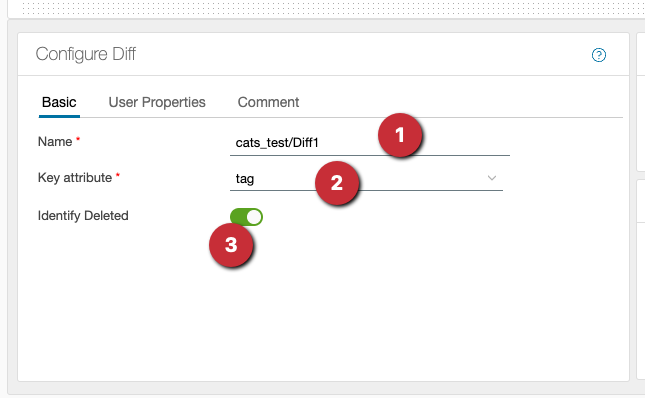
- assign a name for the diff
- the key attribute/key column must be present in both data sets and the values must be unique
- the deleted values are not determined by default and no data appears on the output. The output is activated with this switch.