Chioro offers the possibility to store configurations for the access to external data sources in the admin menu:

- access to the admin menu
- here a new configuration can be created
- list of existing configurations. These can be edited by clicking on the name.
New configuration
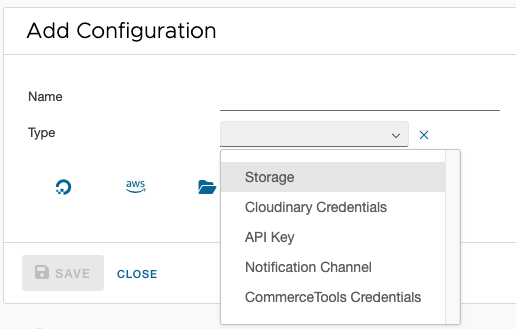
After clicking ‘Add Configuration’ a configuration type must be selected. At the moment API Key, CommerceTools, Cloudinary, Storage and Notification Channel are available.
Bearer Token
A Bearer Token stores a single HTTP authentication token. It is used wherever an external API expects an Authorization: Bearer <token> header — typically REST APIs with API-key-based authentication.
| Field | Description |
|---|---|
| Name | Unique name of the configuration |
| Token | The secret bearer token of the external API |
Basic Auth
Basic Auth stores a username and password for HTTP basic authentication. Chioro automatically sets the corresponding request header in the format Authorization: Basic <base64(user:password)>.
| Field | Description |
|---|---|
| Name | Unique name of the configuration |
| Username | HTTP username |
| Password | HTTP password |
GitHub Personal Access Token
A GitHub PAT (Personal Access Token) stores credentials for a Git repository on GitHub. This configuration type is required by Script Libraries and Flow Backups to read and write snapshots in a Git repository.
| Field | Description |
|---|---|
| Name | Unique name of the configuration |
| Token | GitHub Personal Access Token with repo permission |
| Username | GitHub username (optional but recommended) |
The token can be created under GitHub → Settings → Developer settings → Personal access tokens. The repo scope (read access to public and private repositories) is sufficient for read-only access; contents:write is required for write access.
Anthropic API Key
An Anthropic API Key stores the access key for the Anthropic API (Claude language models). It is required when Claude models are to be used in scripts or transformations.
| Field | Description |
|---|---|
| Name | Unique name of the configuration |
| API Key | The secret API key from the Anthropic dashboard |
The key can be found at console.anthropic.com → API Keys.
API key
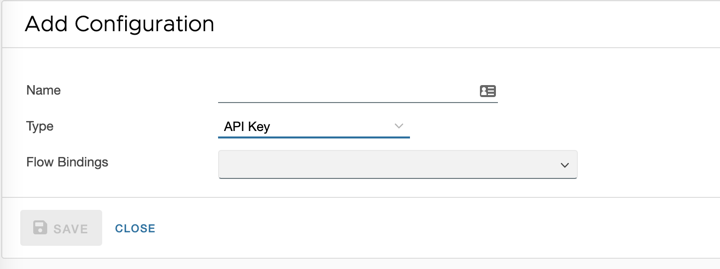
An API key is needed to connect external data sources to Chioro. A detailed description can be found in chapter [Data source](../Operations/Data source).
CommerceTools
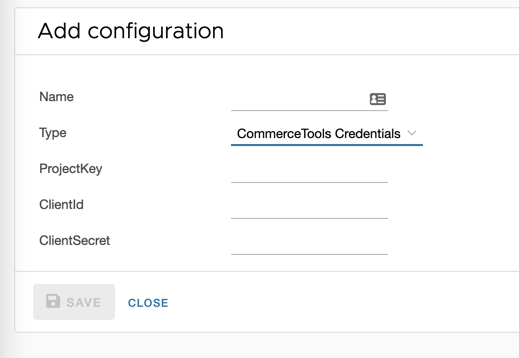
The required access data is generated when creating a project on the Commercetools website and must be entered here.
Storage
Under Storage you have the possibility to mount external file systems. This function is realized by rclone, there you can also find information about the required settings and supported providers:
Several templates are available and can be selected by clicking on the corresponding button. The fields are to be understood as a suggestion, the required fields may differ, depending on the use case. For this reason, lines can be added with ‘+’ and deleted with the trash can icon. In case of problems please contact the administrator.
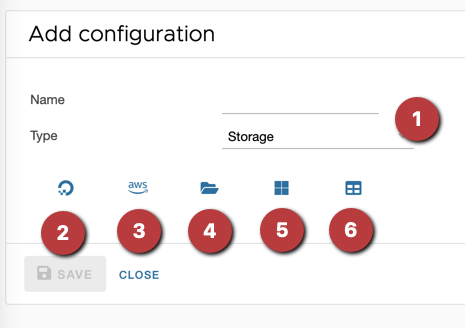
- a name must be assigned
- template DigitalOcean S3
- template AWS S3
- template SFTP (file transfer via ssh)
- template Microsoft Azure
- empty template (‘name’ and ‘type’ must always be assigned)
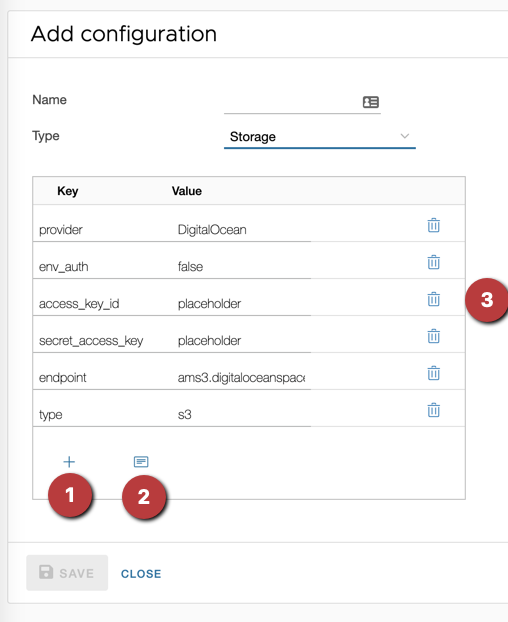
- with the plus symbol lines are added, thus a new key-value entry is created.
- with the template symbol the templates are shown or hidden. Clicking on a new template overwrites all existing fields.
- the trash can icon removes rows.
After clicking ‘Save’ Chioro tries to mount the new data source. In case of error messages the settings have to be adjusted.
Notification Channel
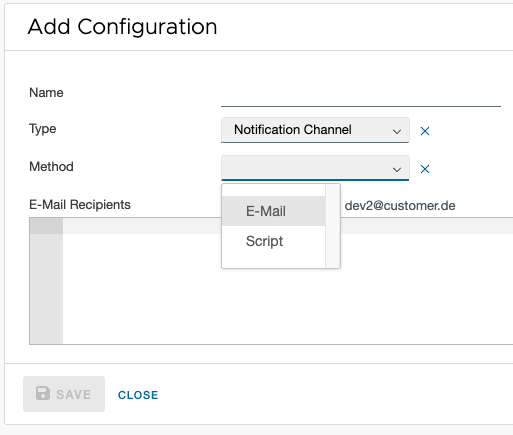
A channel is the target for the notification, which itself gets triggered from a flow or operation.
The default method E-Mail sends, as the name already implies, a E-Mail to the stored recipients with the Handlebar template as the message content. For an example with a set of existing template variables, just save the channel with an empty body and reload. It will be replaced with the default template and than can be changed as desired. To reset back to the default template, just save empty again.
The Script method is intended for more complex notifications, like calls to an url. The template variables, which are used in the E-Mail method, can be accessed like: context('TEMPLATE_VARIABLE_NAME'). (TEMPLATE_VARIABLE_NAME is here a placeholder, the lookup is case-sensitive.)
More under Notifications
OpenAI Provider
An OpenAI Provider stores the credentials for an AI language model, either via the standard OpenAI API or via Microsoft Azure OpenAI. Multiple providers can be configured, for example to use different models or Azure deployments for different use cases.
Fields
| Field | Description |
|---|---|
| Name | Unique name of the configuration |
| Provider Type | OpenAI for the standard API or Azure OpenAI for Microsoft Azure |
| API Key | The secret API key of the provider |
| Endpoint URL | Base URL of the API (pre-filled automatically for OpenAI) |
| Model / Deployment Name | For OpenAI: model name (e.g. gpt-4o). For Azure: name of the deployment in the Azure portal |
| API Version | Azure only: API version string (e.g. 2024-02-01) |
Use Cases
Each OpenAI Provider can be enabled for one or more use cases. Each use case can only be assigned to one single provider across the entire system.
| Use Case | Description |
|---|---|
| Attribute Extraction | Used for AI-assisted attribute extraction in the Structured Transformation |
| Attribute Mapping | Used for AI suggestions when mapping attributes in the List Transformation |
| Value Mapping | Used for AI suggestions when mapping values in the List Transformation |
| Script / Rule | Used by scripts via _gptFetcher.ask() without an explicit config name |
If a use case that is already assigned to another provider is activated, a confirmation dialog appears. After confirmation, the use case is automatically removed from the previous provider and assigned to the new one.
Prompt Settings
| Field | Description |
|---|---|
| Cache responses | Enables the prompt cache. Identical requests are answered from the cache without calling the API again |
| Attribute Mapping Prompt | Handlebars template for attribute mapping requests. Leave empty to use the system-wide default |
| Value Mapping Prompt | Handlebars template for value mapping requests. Leave empty to use the system-wide default |
Usage in Rules and Scripts
The built-in tool askGPT is available in the rule editor and in Script operations:
| Parameter | Required | Description |
|---|---|---|
| Prompt | Yes | The question or instruction to send to the language model |
| Provider Config Name | No | Name of the OPENAI_PROVIDER admin config to use. If omitted, the config with the use case “Script / Rule” is used |
// Uses the provider assigned to the "Script / Rule" use case
askGPT("Translate to German: " + value)

// Uses a specific provider by name
askGPT("Translate to German: " + value, "my-provider-name")
The return value is the AI response text as a string.
Database Credentials
The “Database Credentials” configuration stores a JDBC connection string used to connect to a database. The credentials (including username and password) must be embedded directly in the JDBC URL, as no additional fields are supported.
Supported databases:
- SQL Server
- MySQL
- PostgreSQL
Example JDBC connection strings (replace host, port, database, user, and password as needed):
-
SQL Server:
jdbc:sqlserver://db.example.com:1433;databaseName=mydb;user=myuser;password=mypass;encrypt=true;trustServerCertificate=true -
MySQL:
jdbc:mysql://db.example.com:3306/mydb?user=myuser&password=mypass&useSSL=false&serverTimezone=UTC -
PostgreSQL:
jdbc:postgresql://db.example.com:5432/mydb?user=myuser&password=mypass&sslmode=disable
These credentials are used by the Datasource Database Plugin to execute SQL statements against the configured database.